Thursday, 11 February 2010

Max5 Inputs

ANY INPUT

Max 5 has many inputs available for the software to take in, this is done by using different objects to get the data in, one of these objects is the ctlin which is a midi controller. The following allowed us to find a key's number and a reference number to that key, using keyboards this time, don't worry this will be covered later:


KEYBOARD

The keyboard can also be tracked determining which key you press, the object for this is key and it tells you the ascii number of the key pressed NOT the letter. Here is a complex version of a keyboard tracker:


In the above code when the key 115 is pressed (I think it was P) it activates the toggle button which then turns on or off depending on it's previous state, if on the delay will start repeating at a high rate generating a random number up to 110 by the random object and displayed in the number box, if the button 112 is pressed (can't remember what button that was) the middle circle will light up and if any other key is pressed the right circle will light up.

MOUSE

 Last but not least is the mouse which has 5 parameters:


When the toggle box is active the mousestate objects checks what the mouse is doing, if clicked the toggle box will turn on and off and generate a 1 or a 2 to show if its on or off, the next 2 fields are the X and Y position of the cursor and the last 2 fields are the movement in the X and Y direction, if the user moves the mouse rapidly the numbers will be high compared to slowly where the numbers will be low.

Wednesday, 10 February 2010

Max5 Basics

Max5 is a piece of software that can implement any information through the system using different objects and tools to withdraw the information that is to be changed and also processing it in different ways.

When the program has loaded the first thing to do is open a new patcher, this is the workspace that all the stuff goes onto and where we implement our design. It has two modes; locked means that you cannot add or interefere with the design but you can test it and see how it runs. Unlocked mode is the editing mode where you implement the design and add new objects.

Basic objects and tools are the object box, this is used for objects that perform a action or do something to the data. These are one of the mostly used boxes in Max 5 because you can do so much with them. Along with that there are toggle boxes and option boxes that give control of the data. There are also boxes for integers and strings.

Here is a patcher that generates a random number every time the circle is clicked, the number will be between 1 and 100:


When the circle is cliked it will appear yellow and the number in the number box will change to a random number generated by the random object box which has the variable 100 to tell it what the maximum number outputted desired.

The following is another basic way of controlling data, in this case a toggle object is used, unlike the bottom above a toggle object stays permanently on or off depending on its state. This time a metro is used which is a type of delay and will turn the circle on and off in the delay that we set it. There is also a number box that you can scroll up and down to change the metro's delay time higher or lower/faster or slower.


 Along with controlling data and doing different things to it there are many mathematical techniques that can be implemented into the design to make it better. The following is a example of this:


This design previous adds the two numbers together when they are both clicked, the answer outcome is obviously 10. We can change the connections to make it multiplication, divide or subtract where necessary.
If you know what objects you need you can put them together to make a bigger chain of objects:


The previous picture is a bit more complicated example but its using the same objects in a longer process, they all behave the same though, the toggle object at the top will set the delay for the circle with the number box there to change the interval, the random number object is throwing another random number between 1 and 100 or whatever the maximum number is on the number box, this then has a 1 added to it to make it inclusive of that number and is represented before and after this affect. Not too complicated.

There are many other objects and techniques that allow you to create even more sophisticated and controlling patchers:


Tuesday, 9 February 2010

Dodge Game


This game is an adaptation of a japanese game show, similiar to takeshi's castle, in which players have to position themselves into a gap of an oncoming wall. If they succeeed they will remain on the platform but if the wall hits them they fall back into a pool of water, of course, there won't be any water in the augmented reality version.

The user will have a camera and will have to position themselves to fit onto the screen of whatever they are using to play the game. A wall panel will be seen in the distance with various shapes in it which the person then has to fit through, however easy it may seem at first, the later games hold more challenging shapes. Here are some of those shapes:


The wall will begin to 'launch' towards to player from the background and depending on the players positioning the player will either pass through the wall and prepare for the next one or the screen will flash red to say that the player has failed. The game can also be played by two players:


Instead of having a platform, the player will use the floor and instead of being in a game show, the player can play the game anywhere they want to, within reason.


Interactive TV Guide


My idea is to invent a tvguide that instead of reading, you view the best parts of the programme and can decide if you want to watch it. To view these video's you must need a camera with the software available in it, this is so that when the camera hovers over a specific part of the tvguide the user can see the appropriate advert.

The pointers used to mark this are used in the espire page above and among many other things, they are pictures of black and white shapes that the software interprets and shows the relative video, however, I have not encountered them before neither know what they are called but I would be very interested to work with this technology in this way.


AUGMENTED

New for 2010!       50p

Automatic Translator

My idea is to have a device that takes the sound input and converts it into another language, by recognising speech patterns and words using translation technology the device will turn all language differences into a thing of the past and will allow everybody to communicate via one language as individuals.


In order to do this we need a microphone to input the users voice, some speakers or headphones to output the neccesary language and a piece of software that recognises the speech pattern and changes it to suit a different language, preferrably, I'd like to be able to keep the persons voice so that the output would sound exactly as they would, not a robot made sound, although this would hide a lot of the augment.


This is what I believe it would look like when in action:

Monday, 8 February 2010

Play/Movie Theatre


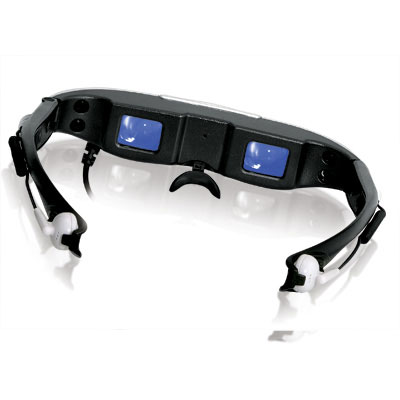
This idea is for a theatre type place that holds a lot of people, these people will pay to come into the theatre and wear the goggles/glasses pictured above which would display the input from a camera at the front, this would mean that the user can see everything around them as they normally would, to find a seat and sit down with their popcorn and beverage. When the lights turn down instead of a projector projecting the video onto a screen, instead the characters will appear in front of the users eyes and appear to be walking in front of them, but they aren't really.

This will allow cartoon characters to star in their own performances, the aim for the watcher to have more of a emotional connection with the character from the whole experience of being able to watch them in a real like reality, also the special effects could be cool.

Augmented Taxi


This idea is a follow up to the pool robot which would intake things from the real world and determind its own actions depending on the state of the real world. I liked how instead of watching a our own reality in a augmented reality there could be a augmented thing in our reality. The customers could text a number saying "taxi" and using GPS the navigation would know where they are and there could be a text message relay to say when the taxi arrives. When the client gets into the taxi they will notice the artificial driver. Two inputs from the client is the destination and the money for the fare.


The customer puts there postcode / destination into the computer which is similar to a satnav because it uses the same technology. Using route finder software the computer can produce a route on road for the taxi to take including other information such as distance, traffic and speed area's.

Either up front or as the taxi reaches the destination the computer will give the customer feedback on the price of the fare then customer puts their money into the slot. The change will be given to the customer after.

As for the driver they will be a holographic display of the companies employee and could have speech or communication technologies built in. The driver must also know how to avoid collisions and other things that may appear on the road, to do this the computer will interpret the hazards in the real world and determine the best possible action, as shown in the second video. The first video shows the project of a holographic driving assistant: